GIS Mapping Applications and Software: Uses, Benefits, & Examples
GIS mapping links geographic features to data about those features. It turns raw data into visual maps and analytic insights, helping users see what is happening where and answer complex spatial questions.
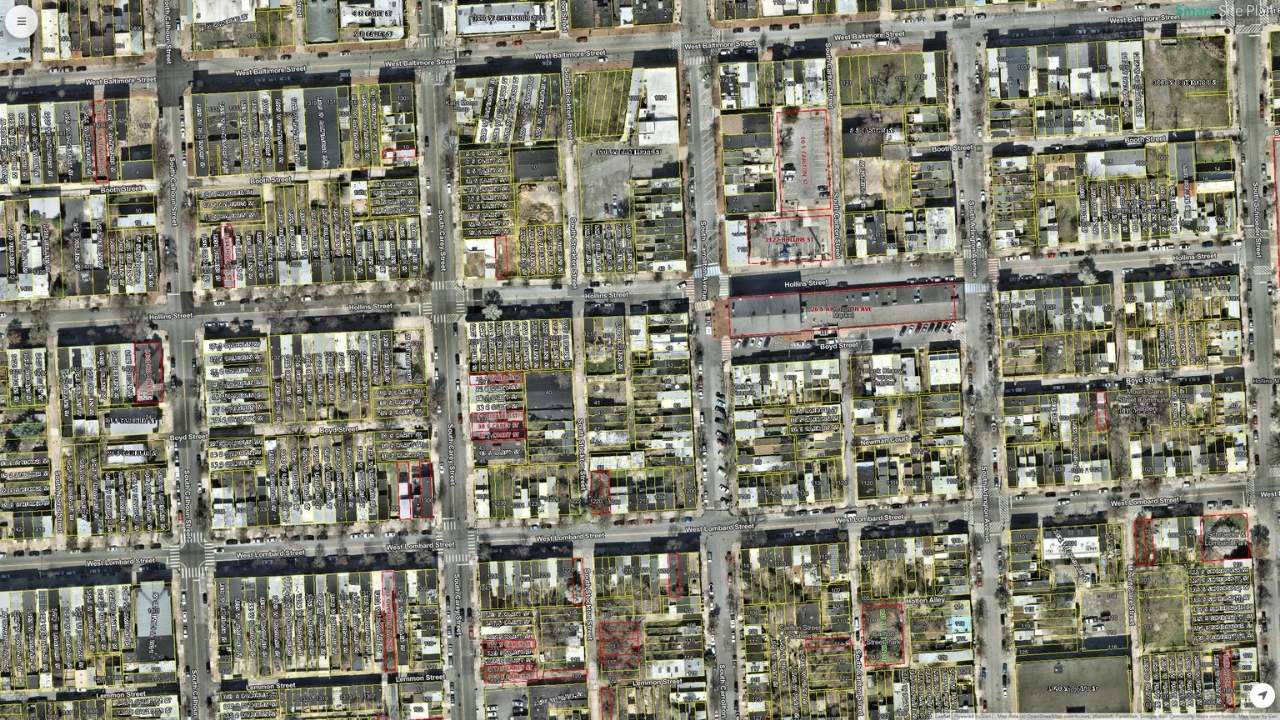
GIS (Geographic Information Systems) mapping is a technology that works with spatial data. It allows users to create, visualize, and analyze maps that combine geographic locations with various types of data. GIS connects data to a map by integrating location data (the where) with attribute data (the what). By layering the data, GIS reveals patterns and relationships that might not be apparent from spreadsheets or charts alone. Every map feature, whether a point for a tree, a line for a road, or a polygon for a lake, can be linked to a database record full of details. Spatial data can be vector format (points, lines, polygons) or raster format (pixel-based images like aerial photos or elevation grids). This linkage is what separates GIS from a mere drawing or image of a map.
Key Takeaways
- Better decision-making: visualizing data geographically reveals patterns and relationships that support evidence-based planning and policy
- Enhanced data management and integration: GIS compiles disparate data sources (spreadsheets, CAD drawings, inspection lists) into a single system organized by location
- Clear communication and visualization: complex data is translated into maps, charts, and interactive dashboards that stakeholders can understand quickly
- Layering multiple datasets: users can overlay roads, land use zones, utilities, and population density on one map and query how layers interact
- Environmental monitoring: track deforestation, habitat loss, land use changes, biodiversity hotspots, and pollution sources
- Transportation and logistics: route optimization, fleet management, infrastructure design, and long-term hub planning
- Public health: map disease outbreaks, analyze healthcare accessibility, and coordinate response
- Emergency response: GIS helps responders understand what is happening and where before, during, and after disasters such as hurricanes, fires, and earthquakes
What is GIS (GeographicInformationSystem) Mapping, and How Does It Work?
It turns raw data into visual maps and analytic insights, helping users see what is happening where and allowing them to ask complex questions like “What areas have high population density but low access to hospitals?” or “Which utility lines need upgrading based on age and load?”
Integrating Spatial and Attribute Data in GISSoftware
One of the core strengths of GIS is how it ties together spatial and non-spatial information. In a GIS, every map feature (whether it’s a point representing a tree, a line representing a road, or a polygon representing a lake) can be linked to a database record full of details about that feature. This linkage is what separates GIS from a mere drawing or image of a map. If you can understand these concepts, you’re well on your way to understanding a GIS.
- Spatial Data (Geographic): This is the where. It defines the shape and location of features on a planet’s surface. Spatial data can be in vector format (points, lines, polygons defining discrete objects like wells, roads, and parcels) or raster format (pixel-based images like aerial photos or elevation grids). For example, the outline of a city park on a map or a set of coordinates for a bus stop are spatial data.
- Attribute Data (Tabular): This is the what. Attributes are stored in tables, much like a spreadsheet or database, where each row corresponds to one feature on the map, and columns hold information about that feature. For the city park example, attribute data might include the park name, area, type of amenities, and maintenance schedule. For the bus stop, attributes could include the stop ID, routes served, and number of daily passengers.
GIS integrates these by a unique identifier or the inherent link of each feature to its attributes. When you click on a feature in a GIS map, you can retrieve all its stored information. Conversely, you can query the data (say, “find all parks larger than 5 acres with a playground”) and have the GIS highlight the spatial features that match.
Key Components of a GISSystem
A working GIS brings together several components that must all function for the system to be effective:
Not all GIS systems are built the same. For example, Smart Site Plan was built to require less specialized expertise and be easier to use. To help streamline your experience, it doesn’t require some of the components below. Curious? Let’s talk.
- Hardware: This refers to the computers, servers, mobile devices, GPS units, and other equipment on which GIS operates. Robust hardware (powerful CPUs, ample storage, possibly dedicated GIS servers or cloud infrastructure) is needed to handle complex spatial datasets and render detailed maps quickly. For example, a GIS workstation might store aerial imagery and perform analysis on millions of map features, so it requires sufficient processing power and memory.
- Software: GIS software provides the tools to input, manipulate, analyze, and display geographic data. This includes desktop applications (like ArcGIS, QGIS, or us, Smart Site Plan), web-based platforms, database management systems for spatial data, and even mobile apps for field data collection. The software is the core of the GIS, enabling users to create maps, run spatial analyses (such as finding the optimal route or estimating areas), and generate reports or visualizations.
- GeospatialData: Data is the fuel for any GIS. This encompasses spatial data (maps, satellite imagery, GPS points, digital elevation models, etc.) and associated attribute data (tables of information linked to map features). Spatial data can come from various sources – for instance, a city’s GIS may include parcel maps, utility network diagrams, census demographics, environmental sensor readings, and more. High-quality, up-to-date data is essential because the insights from a GIS are only as good as the data input.
- People: Skilled people are a vital component of GIS (Surprised? The AI’s haven’t taken over the world yet). This includes GIS professionals who manage the system and analyze data (such as GIS analysts, cartographers, and spatial data scientists) as well as the end-users who rely on GIS outputs for decision-making (planners, managers, field engineers, etc.). People design the GIS workflows, interpret the results, and ensure the system addresses real-world needs. Without knowledgeable people to operate the software, maintain the data, and apply results to problems, a GIS would have little value.
- Methods: These are the procedures, standards, and techniques that govern how GIS is used. Good GIS practice involves defined methodologies for data collection (e.g., using GPS or remote sensing), data validation and updating, analysis (choosing appropriate spatial analysis techniques or models), and map presentation. Consistent methods ensure the GIS work is repeatable, accurate, and aligned with the organization’s objectives. For instance, a city planning office might establish a method for how often aerial images are updated, or a utility company might have standard procedures for recording the location of new assets in the GIS.
Each of these components contributes to an effective GIS implementation. If any component is weak (for example, outdated data or lack of trained personnel), the GIS’s usefulness will be limited. But when all five components work in harmony, a GIS becomes a powerful decision-support system.
Benefits of GIS Mapping in Professional Settings
Using GIS mapping can bring numerous benefits to organizations and professionals across different fields. Some of the key advantages include:
- Better Decision-Making: By visualizing data geographically, decision-makers can see patterns and relationships that inform smarter choices. GIS helps answer location-based questions (e.g., Where is the best place to expand our services? or Which regions are most at risk?). This leads to decisions grounded in evidence and spatial context rather than intuition alone. In fact, GIS is widely used as a decision-support tool in business and government because it reveals insights that improve planning and policy.
- Improved Efficiency and Cost Savings: A GIS can automate and streamline tasks that once took considerable time. For example, instead of manually searching paper maps, an engineer can use GIS to instantly locate all utility lines in an area. Route optimization using GIS can save fuel and time for delivery fleets. By managing infrastructure or resources through GIS, organizations often reduce operational costs (fewer redundant site visits, optimized resource allocation) and avoid costly mistakes (like digging in the wrong location). In short, doing things “with GIS” tends to be faster and more efficient than traditional methods.
- Enhanced Data Management & Integration: A GIS provides a framework to compile disparate data sources into a single system. An organization might have data in many forms – spreadsheets of customer addresses, CAD drawings of pipelines, lists of asset inspections, etc. GIS can link these by location and keep them organized. This centralization means everyone works off the same geographic information, reducing inconsistencies. Historical data can also be layered in GIS, so changes can be tracked over time (e.g., urban growth or deforestation trends), which is invaluable for analysis and reporting.Clear Communication and Visualization: Maps are often more intuitive than raw data. GIS mapping allows complex data to be translated into visual map outputs (charts, maps, interactive dashboards) that are easier for stakeholders to understand. Whether it’s a heat map showing sales by region or an evacuation map during a disaster, GIS visuals communicate information quickly and effectively. This improves communication among team members, departments, and the public.
- Spatial Analytics and Problem-Solving: A GIS comes with analytical tools that help solve real-world problems – finding optimal locations (site selection), detecting patterns (hotspot analysis for crime or disease), modeling scenarios (flood modeling, traffic simulation), and more. These spatial analyses can reveal why something is happening in a location, not just where. By integrating spatial thinking, professionals can devise targeted solutions.
Some businesses don’t require elaborate rendering programs or terabytes of data pouring in through custom APIs tying together countless databases. They don’t need complex reporting and real-time analytics. That’s okay too. We love those businesses, and our platform brings all the benefits of a GIS without that complexity. Want to learn how?
Use Cases Across Different Industries
Many industries rely on GIS mapping to tackle their unique challenges. Below are several example use cases illustrating how GIS is applied in different professional domains:
1. Utilities: Service Line Mapping and Management
Utility companies and property owners (electricity, water, gas, telecommunications) use GIS to map their service lines and assets. By creating a detailed digital map of the network, utility companies can visualize and analyze their entire network as a real-world infrastructure model. Every pole, transformer, valve, or pipe can be linked to attribute data like installation date, material, capacity, or maintenance history. This comprehensive view helps in several ways:
- Asset Management: Technicians can quickly locate equipment and assess which components might be affected if there’s an issue (for example, which customers would lose service if a water main breaks on a certain street). GIS can also log repairs and outages, building a history for each asset.
- Network Analysis: Utilities analyze spatial data to improve reliability. GIS might be used for electricity to reroute power from other lines if one goes down or to plan optimal placement of new substations by examining demand hotspots on the map. For water/sewers, GIS can model the flow and pressure of pipes.
- Field Operations: Field crews often use mobile GIS apps to get driving directions to sites and to update asset information on the spot. If a gas leak is reported, responders see the gas line map in GIS and valves to shut off and nearby sensitive facilities, improving response time.
- Planning and Resilience: When upgrading infrastructure or expanding service, GIS helps identify the best routes or areas by layering maps of current lines, geography (hills, rivers), and land ownership. It’s also invaluable for disaster resilience. For example, a utility can overlay storm surge maps with their network to see which substations are at risk of flooding.
By relying on GIS and location intelligence, utilities develop a deeper understanding of their operations and can map networks in incredible detail. This leads to reduced downtime (faster troubleshooting when you can pinpoint problem locations), optimized maintenance (fixing or replacing the right component at the right time), and better customer service. It can even improve compliance with critical safety mandates such as the EPA Lead and Copper Rule.
2. Urban Planning and Infrastructure Development
Urban planners and infrastructure developers use GIS to make informed decisions about land use, zoning, transportation, and public works projects. City governments, regional planners, and developers deal with questions of where to build, what impacts development will have, and how to optimize land use for community needs. GIS is a natural fit because it can incorporate many data layers relevant to cities:
- Current Land Use and Zoning Maps: Planners maintain GIS maps of how land is currently used (residential, commercial, industrial, green space, etc.) and the zoning regulations. With GIS, they can query, for example, all vacant parcels zoned for commercial use when seeking a site for a new business.
- Infrastructure and Utilities: GIS maps of roads, public transit lines, water and sewer networks, etc., allow planners to see how well different areas are served and where gaps exist. If a new housing development is proposed, GIS helps check if infrastructure capacity is sufficient or needs an upgrade.
- Environmental and Geographical Data: Planners use GIS to overlay flood zones, soil stability, or protected habitats to avoid unsuitable areas for building. By processing satellite imagery, aerial photos, and survey data, gaining a detailed perspective on the land and environment.
- Scenario Modeling: Perhaps the most powerful aspect is modeling “what if” scenarios. Planners can use GIS to simulate changes – for instance, how would traffic flow change if a new highway is added? What areas would be affected if zoning allowed taller buildings? GIS can pull together vast amounts of information to balance competing priorities and solve complex problems.
GIS enhances data-driven planning. It helps urban planners better understand a city’s current needs and design to meet them. By seeing all relevant factors on a map, planners can make decisions that account for population growth, infrastructure limits, and environmental constraints. This leads to more sustainable and efficient urban development and infrastructure investments.
3. Environmental Monitoring and Management
Environmental professionals use GIS to monitor natural resources and environmental conditions. Whether tracking wildlife habitats, monitoring pollution, or managing conservation areas, GIS provides the tools to map and analyze ecological data over space and time.
- Wildlife and Habitat Monitoring: GIS is used to map the distribution of species and habitats. For example, conservationists might map nesting sites of an endangered bird and overlay land cover maps to see how habitat is changing. By comparing GIS data over years, they can spot trends like habitat loss or range shifts due to climate change.
- Pollution and Water Quality: Environmental agencies deploy sensors and collect samples (for air quality, water purity, and soil contamination). GIS can map all these readings to identify pollution hotspots and trends. For instance, it might reveal that water quality is poorest downstream of certain facilities, prompting targeted investigations.
- Land Use and Forestry: Satellite imagery and remote sensing data imported into GIS allow monitoring of deforestation, urban sprawl, or crop health. Analyzing imagery can quantify how much forest cover was lost in a year or identify areas of unhealthy vegetation in a crop field.
- Disaster Risk and Climate Data: GIS is key for mapping areas prone to natural hazards (floodplains, wildfire risk zones, coastal erosion areas). Environmental managers use these maps to prioritize preventative actions (like strengthening river levees or implementing controlled burns in high-risk fire zones). With climate data layers (precipitation, temperature changes, sea-level rise projections), GIS helps model future environmental scenarios and plan adaptive measures.
GIS brings precision and clarity to environmental monitoring. It allows agencies to track emissions, water quality, and land use changes with precision, often in real-time (Leveraging GIS Technology for EHS Management | NREP). Complex environmental datasets become more understandable when visualized on a map, aiding in identifying causes and effects.
4. Emergency Response and Disaster Management
In emergency management, GIS is used to plan response strategies and coordinate actions during crises. Whether it’s natural disasters (like hurricanes, earthquakes, wildfires) or man-made incidents (chemical spills, public safety emergencies), responders leverage GIS to map the event and deploy resources effectively.
- Preparedness Planning: Before disasters strike, GIS helps create hazard maps and emergency plans. For example, officials can use GIS to map flood zones and then designate evacuation routes and shelter locations on the map. They can also run simulations – like a hurricane storm surge model – to see which areas would be inundated and plan responses accordingly.
- Situational Awareness: GIS serves as a common operating picture during an emergency. Multiple data feeds can be brought into a live map: the real-time location of response units, weather radar, active 911 calls, power outage reports, etc. This visual integration lets coordinators see what’s happening and where, moment by moment.
- Resource Allocation: GIS helps decide where to send emergency resources (police, ambulances, repair crews, supplies). For instance, after an earthquake, a GIS map might combine building damage reports with population density to prioritize rescue operations in the hardest-hit, most populous areas.
- Public Information: GIS is also used to communicate with the public. Interactive web maps can show road closures, the extent of a wildfire, or locations of relief centers so citizens have up-to-date information. This improves safety and helps people make informed decisions (e.g., which route to take when evacuating).
GIS is crucial for emergency response planning and real-time coordination. It effectively saves lives and property by optimizing the response. It brings order to the chaos of emergencies by ensuring that all players are looking at the same spatial information and that help is deployed to the right places as fast as possible.
5. Agriculture and Land Use Planning
In agriculture, farmers and agribusinesses use GIS for precision farming and land management. For broader land use planning (such as regional land allocation or rural development), GIS helps officials plan the optimal use of land resources. As modern farming increasingly relies on data, it allows for greater visualization and analysis to improve decision-making:
- Crop Planning and Soil Management: Farmers use GIS to analyze soil maps, topography, and historical crop yields to decide which crops best suit each field. It can highlight variations in soil composition or moisture within a farm, enabling tailored planting strategies. For example, a farmer might discover that one section of a field has poorer drainage and choose a more water-tolerant crop there.
- Precision Irrigation and Fertilization: By layering data on crop water needs, soil moisture, and weather forecasts, GIS helps create precise irrigation schedules that avoid overwatering. Similarly, GIS can guide where to apply more fertilizer and where less is needed based on soil nutrient maps. This targeted approach conserves resources and reduces runoff.
- Crop Monitoring: GIS, combined with drone or satellite imagery, allows farmers to monitor crop health across large areas. Suppose an image layer in GIS shows part of a field having stress (via vegetation index data). In that case, the farmer can inspect and address that specific spot, a practice known as precision agriculture.
GIS enables productive, sustainable agriculture by providing accurate, comprehensive data about the land. Farmers can maximize yields while minimizing environmental impact. This not only improves profitability but also promotes sustainability.
This is not an exhaustive list of use cases. Any company that would benefit from seeing its assets on a map can leverage GIS. This could be an inventory of service lines on a property or a map of assets like computers and VoIP phones on an office floor. Not all cases require intense analytics and reporting. If you feel your company might require a GIS but aren’t sure it’s a good fit, reach out; we’re here to help.
Data Without Context is Dead
The key takeaway for a professional new to GIS is that location is a critical factor in virtually all forms of analysis. GIS mapping helps harness that factor with user-friendly tools and widespread data availability. Today, even non-technical users can start exploring GIS to enhance their projects by collaborating with specialists or using ready-made GIS applications in their organization.
At Juno Maps, we believe that data without context is dead. Gone are the days of manually cross-referencing spreadsheets with maps. Today’s world moves too quickly and demands too much precision for location and data to live separately. For us, a GIS is not just about making maps – it’s about revealing the why and how behind the where. Empowering professionals, companies, and governments across industries with the information to make intelligent and informed decisions that further their goals and those of their stakeholders is the future, and it’s already here because it’s what we do every day.
Ready to Put This Into Practice?
See how Juno Maps applies to your specific industry and use case.